Advanced scam techniques & how to defend

In the past, scams were often easy to spot: it can be suspicious messages, with poor grammar, or random strangers asking for money. Today, things are very different, it evolves!

Modern scammers use psychology, social engineering, AI-generated voices and videos, fake phone systems, and carefully planned trust-building strategies. Even smart, experienced people are getting tricked and losing tens or even hundreds of thousands of dollars.

This article breaks down several advanced scam techniques that are becoming increasingly common, and more importantly, how you can defend yourself and your family.

1. AI Voice & Video Impersonation Scams

One of the most dangerous new scam trends involves AI-generated faces and voices. Imagine receiving a message from a relative asking to borrow money urgently for a surgery! Naturally, you can become suspicious and decide to verify it with a video call. But during the call:

  • You clearly see their face
  • You hear their voice
  • They speak naturally
  • They say they need money to saving a life.

Everything looks real. Except it isn’t. Due to Social Networks and how careless people are using it, scammers can now:

  • Collect photos and videos from social media
  • Generate realistic facial movements from collected photos
  • Clone person’s voice from video sounds
  • Create short fake video calls or deepfake clips from AI-generated photos and sounds

This is possible because modern AI systems can now copy not only face expressions, but also eye movement, head pose, emotional tone from voice and conversational timing.

Warning signs

A major limit of AI generated content is latency. If the conversation get lagged above 300–500ms, human start feeling “off”. That’s why many “real-time” video calls from scammers are usually:

  • Very short conversations & Excuses to avoid longer interaction: This is happen regularlry because scammer can’t predict what you will ask and there is not enough time to generate fake videos.
  • Low resolution: If scammers decide to go with a long video calls and entrust AI to generate deepfake video & audio in realtime, they must have a very strong computer. Low resolution can be a solution to reduce the lag and feel “off”.
  • Delayed audio synchronization & Awkward facial movement: Although AI can clone person’s voice and facial expression, it takes time to process so you can feel the delay in their responses.

In some cases, tiny details reveal the truth — such as outdated clothing, old work uniforms, or backgrounds that don’t match reality.

How to protect yourself

  • Never trust a video call that borrow money.
  • Call the person back via phone number, not Social Networks video calls.
  • Ask unexpected questions only the real person would know.

AI impersonation technology is improving rapidly. Verification habits must improve too.

2. Relationship-Based Business Scams

Some scams are no longer random attacks. They are long-term psychological operations.

The setup

A scammer spends weeks or months building trust with someone online by:

  • Buying products normally
  • Chatting regularly
  • Interacting professionally
  • Acting friendly and reliable

Eventually, they ask for a business introduction. For example:

  • “I’m looking for computer equipment suppliers.”
  • “Can you introduce me to someone trustworthy?”
  • “We have a large government or school contract.”

Because the relationship already feels genuine, the referral happens naturally.

The trap

The scammer then approaches the referred person with a seemingly legitimate business deal:

  • Large purchase orders
  • Attractive profit margins
  • Familiar references
  • Official-looking invoices
  • Corporate or government claims

After negotiations, the scammer introduces a “secondary supplier” or “special product batch” that requires advance payment. The victim may transfers money because they believe that:

  • The deal is legitimate
  • The introduction came from a trusted person
  • The final customer exists

Then the scammer disappears, after receiving money.

Why this scam is so effective

This attack exploits:

  • Trust between family members
  • Professional reputation
  • Fear of missing business opportunities
  • Emotional pressure from “special deals”
  • Greed mixed with familiarity

This scam is carefully calculated so that every step feels reasonable.

How to protect yourself

  • Never rely solely on personal referrals
  • Verify companies independently
  • Refuse unusual invoice-merging requests
  • Be suspicious of advance payments to third parties
  • Confirm contracts through official business channels
  • Slow down when large profits appear “too easy”

Professional scammers are patient. They may spend months preparing a single attack.

3. Fake Government & Military Procurement Scams

A similar scam targets small business owners.

Typical scenario

Scammers pretend to represent: Military departments, Government agencies, Schools, Hospitals, or Large organizations. They contact vendors claiming they need bulk purchases such as: Office supplies, Furniture, Electronics, Plastic chairs, Construction materials. The order appears legitimate and valuable. Then the scammer says:

“We also need another product that you don’t sell. We found another supplier already. Can you help combine the invoice?”

Soon afterward:

  • A fake supplier contacts the victim
  • Payment is requested upfront
  • The victim transfers money
  • Then Everyone disappears

Why victims fall for it

Because:

  • The “customer” sounds official
  • The order size feels realistic
  • The opportunity seems profitable
  • The victim expects reimbursement later

This psychological manipulation is extremely effective.

Defense strategy

  • Government organizations rarely operate through informal personal arrangements
  • Never pay suppliers on behalf of customers without independent verification
  • Verify procurement requests using official government contact channels
  • Be suspicious of invoice manipulation requests

4. Caller ID Spoofing & Fake Support Calls

One of the scariest modern scams involves fake phone numbers and spoofed caller IDs.

What is caller ID spoofing?

Scammers, with tech skills, can manipulate what appears on your phone screen. You may receive a call that appears to come from: your bank, the police, tax authorities telecom providers or government agencies. But the displayed number or name is fake.

How they do it

Modern calling systems using VoIP (Voice over Internet Protocol) allow attackers to manipulate caller information. Combined with high tech attack such as Fake BTS systems, the scam can look extremely convincing.

Common scam scenarios

The caller claims:

  • Your bank account was hacked
  • Your identity is under investigation
  • Your SIM card will be disabled
  • Your tax records need updating
  • Suspicious transactions were detected

Then they pressure you into:

  • Sharing OTP codes
  • Installing apps
  • Clicking links
  • Sending money
  • Changing passwords

The golden rules

  • Never share OTP codes: No legitimate bank or authority should ever ask for your verification code over the phone.
  • Hang up and call back manually: If someone claims to represent an organization: End the call –> Visit the official website –> Call the publicly listed number yourself

Never trust incoming caller IDs alone.


Modern scams are no longer based on technical hacking alone. They rely heavily on emotional manipulation and social engineering. Scammers understand human psychology surprisingly well. Often, victims are not careless or unintelligent, they are simply manipulated under pressure.

Scams are evolving faster than ever. Artificial intelligence, voice cloning, deepfakes, caller ID spoofing, and long-term trust manipulation are making fraud far more convincing than traditional scams from the past. The most important defense today is not technology, it is awareness. A few extra minutes spent verifying information can prevent devastating financial losses. Stay skeptical. Stay informed. And most importantly, help educate the people around you, especially older family members who may be more vulnerable to these increasingly sophisticated attacks.


How Fake BTS Attacks Steal Your OTP — And How to Protect Yourself

If you are receiving OTP via SMS for your bank transfers, logins, or reseting passwords, you must read this. This is a realistic hack happened in real life in many countries and cybercriminals has stolen a lot of money by this trick. Victims are any people who live in countries that still use 2G mobile network, use old phones with 2G network mode enabled by default, and has many things to be stolen.

1. What is 2G mobile network

2G (Second Generation) is one of the earliest digital mobile network technologies, introduced in the 1990s. Unlike the old analog 1G systems, 2G allowed phones to transmit voice calls digitally, making communication clearer and more secure than 1G. 2G was designed mainly for: Voice calls, SMS text messages and Very slow mobile internet (GPRS / EDGE).

Compared to modern networks today such as 4G and 5G, 2G has extremely limited bandwidth and weak security protections. Many security mechanisms used by 2G were created decades ago and are now considered outdated.

Why 2G Still Exists

Even today, many telecom providers still keep 2G active because:

  • Old feature phones still depend on it
  • Some IoT devices use it
  • Rural areas may rely on legacy infrastructure
  • Emergency fallback compatibility

However, this backward compatibility also creates a serious security problem.

2. What Is a Base Transceiver Station (BTS)?

A Base Transceiver Station (BTS) is the radio communication equipment that connects mobile phones to a cellular network. In simple terms, a BTS is the “cell tower” your phone talks to when you:

  • making calls
  • sending SMS
  • using mobile data
  • registering to the network

Every time your phone shows signal bars, it means your device is communicating with a nearby BTS.

Image

MS — Mobile Station

The Mobile Station is the physical mobile phone, plus the SIM card identity inside it. Each MS has identifiers such as:

  • IMSI (International Mobile Subscriber Identity)
  • IMEI (device identifier)

These identifiers are important and fake BTS attacks often try to capture them.

BTS — Base Transceiver Station

The BTS acts as the bridge between your phones and the telecom core network. Its responsibilities include:

  • transmitting radio signals
  • receiving signals from phones
  • managing communication channels
  • broadcasting network information
  • forwarding traffic to the carrier network

A BTS usually covers a geographic area called a “cell.” When you move around, your phone constantly switches between BTS towers through a process called: handover, or roaming

How MS and BTS Communicate

The communication between phone and BTS happens over radio frequencies using GSM protocols. Basic flow is like so:

  1. Phone searches for nearby BTS signals
  2. BTS broadcasts network identity information
  3. Phone selects the strongest or preferred tower
  4. Phone registers itself to the network
  5. BTS assigns communication channels
  6. Voice/SMS/data traffic begins

In 2G GSM, the BTS continuously broadcasts:

  • MCC (country code)
  • MNC (carrier code)
  • Cell ID
  • supported encryption modes

The problem is that early GSM protocols were designed with a dangerous assumption: The phone trusts the BTS automatically. This becomes the core weakness exploited by fake BTS devices.

3. The Security Problem in 2G GSM

In modern 4G/5G systems, both sides, BTS and MS, authenticate each other. But in classic 2G GSM:

  • The network authenticates the user
  • The user does NOT authenticate the network

That means:

  • A fake tower can pretend to be a legitimate carrier
  • Nearby phones may connect automatically
  • Users often receive no warning

Attackers exploit this weakness by broadcasting a stronger signal than legitimate towers. Once the phone connects, the rogue BTS can:

  • Request IMSI identifiers: this means attacker can know your phone number without asking.
  • Downgrade connections from 4G to 2G for weaker encryption: this means attacker can read your SMS.
  • Intercept SMS: this means attacker can even impersonate you and send SMS to your friends, under your name.
  • Send phishing messages: attacker can impersonate other legit phone numbers, your boss’s number for example, to send you a link and require you to fill passwords

This is the fundamental mechanism behind IMSI Catchers and Fake BTS attacks.

4. What Is a Fake BTS (IMSI Catcher)?

Mobile phones are designed to automatically search for the “best” available cellular signal. In GSM/2G networks, your phone often prioritize connecting to BTS tower that has stronger signal. Attackers exploit this behavior by broadcasting:

  • Stronger signals than nearby legitimate towers
  • with Copied carrier information
  • with Attractive network parameters

To the phone, the fake BTS appears to be a normal carrier tower. Because classic GSM lacks proper network authentication, the device may connect automatically without warning the user.

IMSI stands for: International Mobile Subscriber Identity. It is a unique identifier stored inside the SIM card. An IMSI Catcher is named after its ability to trick phones into revealing this identifier. Once attackers collect IMSI numbers, they can:

  • Identify devices
  • Track movement
  • Target specific users

This is one of the first steps in many surveillance-oriented attacks.

5. Attack Setup (High-Level, No Harmful Instructions)

A simplified Fake BTS attack flow is like so:

  1. Attacker activates rogue BTS equipment to be a fake tower
  2. Fake tower advertises itself as a legitimate carrier
  3. Nearby phones detect strong signal
  4. Devices connect automatically to the tower with stronger signal
  5. Then Fake BTS requests device identifiers and controls the communication process.

Depend on attacker’s purpose, the fake tower can:

  • Downgrade your phone from 4G to 2G: this is the most common technique for stealing OTP purpose.
  • Disable encryption: so attacker can read SMS content, which may contains OTP code.
  • Forward traffic to real networks: this is so called: Man-In-The-Middle attack, where attackers keep you communicating normally, but can eavesdrop everything.
  • Inject phishing SMS messages: you can receive SMS from your friend numbers, but actually that SMS is delivered from fake BTS tower, your phone just display it.

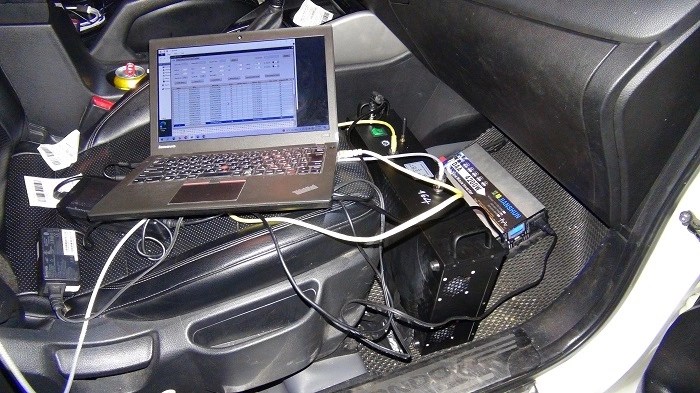
Below is a confiscated fake BTS, captured in public, by police, while doing above attack:

6. How to defend

Symptoms of a Possible Fake BTS Attack

Detecting a Fake BTS in real life is extremely difficult. Modern rogue base stations are designed to look almost identical to legitimate carrier towers, and most smartphones provide very little visibility into low-level cellular behavior. Still, there are several warning signs that may indicate suspicious activity.

Sudden Drop to 2G or “E” Signal

One of the most common indicators is your phone suddenly falling back from 4G/5G to 2G, commonly with the icon “E” instead “4G” on top-right corner of the phone screen. Attackers often force devices onto 2G because:

  • GSM security is weaker
  • Phones trust the network more easily
  • Encryption protections are cracked easily

A downgrade becomes more suspicious when 4G/5G coverage is normally strong in the area but the signal change happens unexpectedly, and, multiple nearby devices behave similarly.

Weak or Missing Encryption Indicator

In classic GSM networks, the BTS controls whether encryption is enabled. A rogue BTS can force weaker encryption, or request no encryption at all. Historically, some phones displayed warnings such as: “unencrypted network”, “ciphering disabled”. But today, most smartphones hide these low-level network details, so users rarely receive visible warnings. As a result, users may have no obvious indication that something suspicious is happening.

Reality: Detection Is Extremely Difficult

The uncomfortable reality is: Most users cannot reliably detect a Fake BTS attack. Reasons include:

  • Users do not understand how phone calls and SMS work in tech.
  • Smartphones show very little info about radio diagnostics.
  • Rogue towers can imitate legitimate carrier behavior.

Even cybersecurity professionals often require specialized equipment to investigate suspicious cellular activity. Advanced detection may involve using SDR (Software Defined Radio) analysis, Baseband Monitoring tools and Carrier database comparisons. But ordinary users typically have no easy way to confirm whether a nearby tower is genuine.That is one reason Fake BTS attacks remain effective even decades after GSM was introduced.

Mitigation Strategies

Due to it is unreliable to detect a Fake BTS, it is reliable to stay away from OTP sent via SMS. Use Authenticator app such as Google Authenticator, or Authy, for OTP is highly recommended. Beside of that, make sure to disable 2G on your phone if it still support 2G. Most of today mobile phone disable 2G by default, so if you are using old phone, let search on how to disable 2G on your phone model. Last but not least, Avoid login, resetting password, or doing bank transfer on public networks, only do it in your trusted places.


3 steps to avoid malicious mobile apps

Today, everyone has smart phones, from children to elders. Smart phones contains a bunch of applications that increase productivity in real life. Human today may spend time with smart phones even more than with human. Smart phones become a part of life, an accessories, and maybe secrets holder of everyone. People put almost everything in their phone, from photo, identity to bank accounts. This habit makes smart phones top priority target for hackers in hacking campaigns, to steal secrets, or simply money. These hacking campaigns usually exploit users’s low awareness or low knowledge about mobile app security factors. Android & iOS, as default, provide many mechanisms to protect users from getting hacked but the weakest point in the system is always human psychology. “Amateurs hack machine, Professionals hack people“. If you are afraid of hacking, this post is for you. This post hopefully can guard your mind up to defense against one of the highest risk factors in Internet era: cybercriminal.

Most of cyber security incidents – aka get hacked – known in public begins from a very non-technical step and can be performed by anyone, named Social Engineering. Social Engineering is a type of manipulation where someone tricks people into giving away sensitive information, access, or money—by exploiting human psychology rather than hacking systems. To steal data from your phones, 99% of time, hackers need to trick you to install malicious applications. Malicious applications, once installed, will silently steal data and send back to hackers. So, just by acknowledging which app can be malicious, you already get you safe 99%. The rest 1% is involved to Zero Day exploitations, which are real hacking, require top-notch hacking knowledge and skills, but will not be mentioned in this post. For more understanding about Zero Day exploitations, you can subscribe here then the-tech-lead.com will inform you when there is any article available.

Here we back to How to know if a mobile app is malicious!

1. Double Attention on download source

As a golden rule for mobile applications, only download from trusted store which is PlayStore and AppStore. PlayStore and AppStore is pre-installed on any Android or iOS smartphones. For any applications, only download from PlayStore app (for Android phones such as Samsung, Pixel, Nexus, etc) and AppStore app(for iPhones). Do NOT install any applications outside these 2 official stores, regardless any reasons, urgency or who tell us.

For Android world, mobile applications are written in Java and Kotlin language, exported as APK files (file has extension .apk). This .apk files then be signed with digital signature of its owner – who registered as developer on PlayStore with their legal information. This process is essential as it can tell who actually behind an application, and if we has evidence about any malicious activities, we know who to sue. The information of who develop certain application can be found at section “App Support” under its logo.

APK files can be installed directly to Android phone via user’s explicit grant. Users can tap to .apk files stored in their phone (inside Download folder, or Document folder for example), a popup will display asking installing permission. If user grant it, the .apk will be installed. This process usually is for developers to test applications before submitting to PlayStore. For regular users, this process is an absolute indicator for a malicious application. So if someone, for any reason, tell you to do these steps manually, don’t trust them and report them to police asap. Typical trick flow is like so:

  1. You are on Social Network such as Facebook, seeing a post tell that install an application to get free 1000USD as a reward for its early users.
  2. You click on download link, your phone download it into Download folder
  3. You follow “installation guide” written next to download link, saying that you open Setting app, enable “installation app from unknown source”, then open Download folder, tap on APK file.
  4. Your Android phone show a popup telling you that APK is from unknown source, but according to the guide, it tell you just press Accept.
  5. Then the malicious APK is installed then it steal your data.

Similarly, on iPhone world, iOS applications are written in Swift and ObjectC language, and exported as .ipa file. IPA files can be installed via the App Store or through developer tools like Xcode. Usually, we can’t freely install IPA files unless the app is signed with a valid certificate or the iPhone is registered for development. But there is still a trick that hacker can trick users to install malicious IPA files: via TestFlight abusing. TestFlight is Apple’s official tool for distributing beta (testing) versions of iOS apps before they go public on the App Store. Developers use it to invite testers, collect feedback and fix bugs before release. TestFlight is legit—but it can be abused in social engineering attacks. Typical trick flow is like so:

  1. Someone impersonates a bank employee, call you, tell exactly your name, your address, and saying “Your bank account is in legal risk due to a transfer from criminal gang” or “Police is screening your account because they think you laundry money”, with urgent, serious, and a bit threaten.
  2. Then they sent you a link to install their internal iOS app to prove that you are innocent.
  3. You tap on that link, iPhone redirect you to TestFlight app because it is TestFlight invitation link and your iPhone does not have TestFlight installed
  4. Then you are told to tap on the link again, this time the fake application is installed to your iPhone, via TestFlight
  5. The fake app looks the same to bank’s official application so you have no doubt
  6. But the app then steal data from your iPhone, or trick you to fill username, password, even OTP and CVV number

2. Make sense of app permissions

When users smart enough to not install app from untrusted source anymore, hackers may use level 2 of malice: Camouflage. Typical hacking plan is like so:

  1. This time, hackers develop or purchase normal mobile application source code then publish via PlayStore and AppStore normally.
  2. Because it is normal, PlayStore & Appstore accepts and make it available.
  3. Then hacker send next updates for the normal application, with new features requiring some system permissions such as: read contact list, read call logs, read gallery, read GPS, etc…
  4. Hackers advertises that app with awesome features that can make outstanding outcomes, right in need of some users.
  5. Then with curiosity, users install the app, from PlayStore, or AppStore depends on their phone OS.
  6. The app requires user to grant quite a lot permission but users usually don’t care and don’t understand so just accept it.
  7. Then the app steal call logs, photos, location data, etc …, from the phone, thanks to user’s grant.

Both Android & iOS has default safeguard to protect user’s privacy. Every application, as default, can not access to sensitive data on smart phone. For example, if an application want to read some photos, developer – who is making that application – must register “Access Gallery” permission. Then whenever the application want to use this permission, the operating system (Android / iOS) will display a message asking users to grant that permission. When granted, application now can see photos in the phone. Similarly, other sensitive info such as call logs, GPS, and many more also requires user grant permission before the app can actually read data. To know an application want what permission, we can check right on PlayStore for Android app, and AppStore for iOS app.

How to check Permissions of Android application

Before installing:

  1. Open the app page on the Google Play Store
  2. Scroll down to “App info” → “Permissions”
  3. Tap “See more” to view full details
  4. Check what the app can access:
    • Location
    • Contacts
    • Storage
    • Microphone, etc.

After installing:

  1. Go to Settings → Privacy → Permission Manager
  2. Select a permission (e.g. Location)
  3. See which apps are using it
  4. You can:
    • Allow
    • Allow only while using
    • Deny

👉 Tip: Android also shows permissions during first use, so don’t just tap “Allow” automatically.

How to check Permissions of iOS application

Before installing:

  1. Open the app page on the App Store
  2. Scroll to “App Privacy” section
  3. Review what data the app may collect:
    • Location
    • Contacts
    • Identifiers
    • Usage data
    • etc …

After installing:

  1. Go to Settings → Privacy & Security
  2. Tap a category (e.g. Location, Photos, Microphone)
  3. Select the app
  4. Choose access level:
    • Never
    • Ask Next Time
    • While Using
    • Always (for location)

Review these permission carefully. Anticipates which features need it. If there is too much permissions comparing to expected features, it is a red flag.

Here’s a practical mapping of common Android & iOS permissions you’ll see on the Google Play Store, AppStore and the features that legitimately use them. This helps you judge whether a request makes sense.

Android Permissions & Legit Features use them

PermissionLegit FeaturesSuspicious If
Read Contact, Write ContactMessaging apps (find friends)
Contact backup/sync
Invite friends feature
Suspicious if a simple game or flashlight asks for this
Read Call Log, Read Phone StateCaller ID / spam detection apps
Dialer & call management
Suspicious if: unrelated apps request call history
Read SMS, Send SMSMessaging apps
OTP auto-fill
High Risk: can intercept verification codes
Recommend: NEVER download
Access Fine Location, Access Coarse LocationMaps & navigation
Ride-hailing / delivery
Weather apps (local forecast)
Suspicious if: calculator or offline app asks for precise location
Read External Storage, Media AccessUpload photos (social media)
File managers
Image/video editing apps
Suspicious if: app doesn’t handle files but asks access
Record AudioVoice messages / calls
Recording apps
Voice assistants
Suspicious if: no voice feature exists
CameraTaking photos/videos
QR/barcode scanning
Video calls
Suspicious if: app has no visual capture feature
Notification accessNotification managers
Smart reply apps
High risk: these app can read OTPs and messages,
Recommend: NEVER download
Accessibility ServiceScreen readers (for visually impaired)
Automation tools
High Risk: these app can control screen, read inputs, commonly abused in scams
Recommend: NEVER download

iOS Permissions & Legit Features use them

PermissioniOS Permission Name / KeyCommon Legit FeaturesSuspicious If…
ContactsContacts (NSContactsUsageDescription)Messaging, contact sync, invite friendsGame or simple app requests it
Location (GPS)Location (NSLocationWhenInUse / Always)Maps, ride-hailing, delivery, weatherApp doesn’t need location
Photos / MediaPhotos (NSPhotoLibraryUsageDescription)Upload images, editing appsApp doesn’t use images/files
CameraCamera (NSCameraUsageDescription)Photos, video calls, QR scanningNo camera-related feature
MicrophoneMicrophone (NSMicrophoneUsageDescription)Voice calls, recording, voice inputNo audio-related feature
BluetoothBluetooth (NSBluetoothAlwaysUsageDescription)IoT devices, wearables, accessoriesApp has no hardware/device interaction
NotificationsNotifications (UNUserNotificationCenter)Alerts, messages, remindersSpammy or excessive notifications
TrackingApp Tracking Transparency (ATT)Ads personalization, analyticsApp unrelated to ads asks for tracking
Local NetworkLocal Network (NSLocalNetworkUsageDescription)Smart home, device discoveryNo local device interaction
Motion / FitnessMotion (NSMotionUsageDescription)Fitness apps, step trackingApp unrelated to activity tracking

Simple rule to evaluate permissions

When you are considering to install a new mobile application:

  • Anticipate what functions that app may have,
  • Check the Permissions that app requires
  • Then ask yourself: “Does this feature really need this permission?

If there are permissions that is not aligned with expected functions:

  1. Then slow down, don’t rush to install for whatever reason.
  2. Find alternative applications, compare Permissions among them.
  3. If you not sure but want to check the app, use Emulators to test it first. Emulators is virtual smart phones and can be created via tools such as Genymotion, VirtualBox and a few others. Emulators is isolated environment and do not contain your data.
  4. If you know any experts in cybersecurity field, ask them for advise.

3. Monitor phone’s performance

Welcome to the level 3 of malice: Zero Day Exploitation

Thanks to strictly review process of AppStore and PlayStore, most of malicious mobile app is banned. But optimism is not a recommended character in cybersecurity field. Zero Day is vulnerabilities that is unknown by public, even among experts, and in fact, they are weaponized by many governments as a national strength.

Android & iOS itself is softwares. Softwares might have bugs and security holes. These vulnerabilities is actively hunted by experts in cybersecurity industry and sponsored by governments. Once a Zero Day is discovered, it becomes a secret weapon for cybercriminal groups to attack or infiltrate system on over the world. Mobile app is not immune. If there is some vulnerabilities in operating systems, here is Android or iOS, then it will be the target for level 3 of malice.

Although it is rare, but it still a case for us – regular users – to keep an eye on. After install an application from Google Play Store, or AppStore, pay attention on device performance:

  • whether it get slower,
  • or hotter,
  • or get lagged
  • or any abnormal behaviors.

Vulnerabilities has many forms, it is hard to explain on a single post here but many of its form create a lot workload on device, as a try to exploiting, so it may make the phone slower, hotter, or lagged.

Example: a well-known Spyware

One of the most well-known cases of this level 3 of malice involves commercial spyware: Pegasus, developed by NSO Group. This spyware has successfully stolen sensitive data on user’s phone often without any visible permission prompts. The trick flow is like so:

  1. NSO Group Deliver Pegasus via app or link. Target users receives a message that trick them to install the app. The app looks absolutely normal since it require minimal permissions.
  2. Once installed, Hidden zero-day exploit triggers. The app, or content inside it, exploits an unknown vulnerability in Android.
  3. Privilege escalation: The exploit gains deeper system access than normal apps should have and bypasses Android’s sandbox protections.
  4. Silent data access: then NSO Group can access Messages, Camera / microphone, Location without user’s awareness

This attacks are extremely expensive and used for targeted surveillance, not mass scams. Once the exploit method is discovered, it can be quickly patched by developers behind Android & iOS system. But the problem is it really hard to discover.

There isn’t just one single CVE for Pegasus. It has used multiple zero-day vulnerabilities over time, often chaining several together. Here are some of the most well-known ones:

Notable CVEs linked to Pegasus campaigns

1. FORCEDENTRY exploit chain (2021)

  • CVE-2021-30860
  • Affected: iOS (Apple devices)
  • Type: CoreGraphics / PDF parsing vulnerability

What it did:

  • Delivered via iMessage (no user interaction needed)
  • Exploited how the system processed malicious image/PDF data
  • Led to full device compromise

👉 This was one of the most advanced zero-click exploits ever discovered

2. WhatsApp exploit (2019)

  • CVE-2019-3568
  • Affected: WhatsApp on Android & iOS
  • Type: buffer overflow in VoIP call handling

What it did:

  • Attacker placed a WhatsApp call
  • Even if you didn’t answer → exploit could trigger
  • Installed spyware silently

3. Chrome sandbox escape (used in chains)

  • CVE-2020-6418
  • Affected: Google Chrome (Android)

What it did:

  • Used as part of a chain to escape browser sandbox
  • Combined with other bugs to gain deeper access

4. KISMET (suspected chain, 2020)

  • No single confirmed CVE publicly disclosed
  • Targeted iMessage (iOS 13)

What it did:

  • Zero-click exploit (no interaction)
  • Predecessor to FORCEDENTRY

To understand more about these CVE in the future, please subscribe so when the-tech-lead.com post any, you will be informed. Each of CVE deserves a long post itself.


9 habits that make you unsecured on Internet (and how to protect yourself)

In the digital age, personal data is an extremely valuable asset. However, many people unintentionally expose their own information due to habits that seem harmless. Below are common habits that make you vulnerable to data theft—and that you should stop immediately.

1. Using Weak or Reused Passwords

This is the most common mistake in personal security. In many data breach cases, users were found using extremely simple passwords like “123456” or “password”. Others create passwords based on personal information, making them easy to guess.

There are many tools in cybersecurity designed to guess passwords using personal data by trying all possible combinations—this technique is known as brute force.

In addition, reusing the same password across multiple platforms makes things much worse. If one account is compromised, all others are at risk.

Best practice:

  • Use passwords with at least 10 characters
  • Avoid personal information
  • Combine letters, numbers, and special characters

2. Saving Passwords in Browsers

Browsers like Chrome and Firefox offer password-saving features for convenience. However, this habit carries risks.

If these browsers have undiscovered vulnerabilities (known as zero-day vulnerabilities), attackers could potentially steal stored passwords.

Also, when using shared computers—such as in internet cafés, print shops, or even your workplace—you should never save passwords. Others may access your accounts through stored credentials.

Safer alternatives:

  • Memorize important passwords
  • Use encrypted password managers with biometric authentication
  • Always log out after use, especially on shared devices

3. Connecting to Unsafe Public Wi-Fi

Free Wi-Fi at cafés or airports is often poorly secured.

Common risks include:

  • Weak encryption:
    If a network uses WEP or WPA, avoid connecting. These encryption methods are outdated and easily cracked.
    The minimum safe standard today is WPA2 or higher (as of 2026).
  • Evil Twin attacks:
    Attackers create fake Wi-Fi networks with the same name as legitimate ones. If you connect, they can monitor your activity or steal login data.
  • Unnecessary data collection:
    Some Wi-Fi networks request personal information through surveys—you can usually skip this step.

4. Clicking on Suspicious Links (Phishing)

Phishing is one of the most common ways attackers steal data. It relies on psychological manipulation to trick users into revealing information or installing malware.

Common phishing scenarios:

  • Fake banking emails that tell your account has some problems.
  • “You’ve won a prize” messages
  • Fake login pages of others popular websites

To avoid be fooled, you must always double check the domain name on the url. A simple trick is you should search the business name on google and call their customer support to confirm situation.


5. Installing Apps from Untrusted Sources

Applications downloaded from unofficial sources may contain malware designed to steal data.

Attackers often disguise malware as:

  • Free “useful” software
  • Cracked versions of paid tools

Trusting unknown sources can lead to data theft or even ransomware.

Stay safe by:

  • Downloading software only from official websites
  • Verifying sources before installing

6. Oversharing on Social Media

People today spend more time on social media platforms like Facebook, TikTok, and X than in real life.

Sharing too much personal information can be dangerous. Scammers can collect:

  • Your name and location
  • Friends and family connections
  • Habits and interests

This information can be used for scams, impersonation, or malware attacks.

Even more concerning, modern AI can generate fake images or sensitive videos using just a few photos of your face.

Protect yourself by:

  • Limiting personal information shared online
  • Avoiding posting sensitive content
  • Enabling profile privacy settings

7. Not Enabling Two-Factor Authentication (2FA)

Many popular platforms like Gmail, Facebook, and X offer two-factor authentication (2FA).

This feature adds an extra layer of security by requiring:

  • OTP codes sent to your phone
  • Biometric verification

Even if your password is compromised, attackers still cannot fully access your account.

However, 2FA is often disabled by default.

Action step:
Review your accounts and enable 2FA as soon as possible.


8. Not Updating Software & Using Cracked Versions

Outdated software often contains serious unpatched vulnerabilities that attackers can exploit.

Many people think updates are only for:

  • New features
  • Better UI
  • Performance improvements

But the most important purpose is security patching.

Each update typically:

  • Fixes known vulnerabilities
  • Blocks new attack methods
  • Strengthens system defenses

Without updates, you may be using software with publicly known exploits.

In some cases, simply opening a malicious image, audio file, or website can infect your system through these vulnerabilities.

Best practice:

  • Always update to the latest version
  • Avoid cracked software—they may include hidden malware

9. Ignoring App Permissions

Many apps collect more data than necessary, but users often ignore this.

On app stores, applications must declare required permissions—but most users simply tap “Allow” without review.

This habit may result in:

  • Sharing personal data unnecessarily
  • Giving apps access to sensitive system features

Stay in control by:

  • Reviewing permissions before installing
  • Avoiding apps with excessive or unrelated access requests
  • Checking reviews or consulting experts if unsure

Conclusion

The habits that lead to personal data exposure are often small—but the long-term consequences can be severe.

By recognizing and correcting these behaviors, you can significantly improve your cybersecurity awareness and avoid unnecessary risks on the Internet.


7 risks on Internet that You must know

A normal morning.

You wake up, check your phone, read emails, scroll through social media, and pay a few bills. Everything feels fast, familiar—almost automatic.

But within those “normal” moments, countless hidden risks quietly exist in the digital world.

Cyberattacks are not always loud or obvious. Sometimes, they begin with a careless click, a rushed login, or a misplaced trust.

Below are familiar scenarios—each representing some of the most common threats on the internet today that you could encounter at any time.


1. Phishing (Impersonation Scams)

You receive an email from your “bank” warning about suspicious activity. The message looks professional, complete with logos and branding, and includes a link asking you to log in immediately to verify your account.

Feeling concerned, you click the link and enter your information. Everything seems normal… until a few hours later, your account is compromised.

Common signs of phishing:

  • Urgent, well-written emails that mimic official communication
  • Fake login websites that look almost identical to real ones
  • Suspicious domain names (typos, mismatched names, or strange subdomains)

This method exploits users who are unfamiliar with how domains and links work.

If you’re not confident in identifying suspicious links, consider using tools like SafePhone, which can detect and block phishing links before you even access them.


2. Malware (Malicious Software)

You download a free tool online because it “looks useful.” Installation is quick and smooth—nothing seems wrong.

But soon after, your device becomes slower, and your data may be accessed without your knowledge.

This could be malware—software designed to secretly monitor or steal your information.

Common sources:

  • Email attachments
  • Downloads from forums or unknown websites
  • Cracked or pirated software

How to stay safe:

  • Only download apps from trusted platforms like official app stores
  • Install reliable antivirus software
  • Avoid unknown or suspicious files

3. Ransomware (Data Extortion Malware)

One day, you turn on your computer—and all your files are locked. A message appears demanding payment to restore access.

No warning. No undo.

This is ransomware, one of the most serious cyber threats today.

Once inside your system, it will:

  • Encrypt all your data
  • Demand payment for a decryption key
  • Often require payment in cryptocurrencies like Bitcoin or Ethereum to avoid traceability

Prevention tips:

  • Only install software from official sources
  • Use updated antivirus protection
  • Regularly back up your data

4. Online Scams

A friend messages you on social media, saying they’re in urgent need of money. The message feels real—the tone is familiar. Without hesitation, you transfer the money.

Later, you find out their account was hacked.

Common scam patterns:

  • Impersonating friends by copying profile pictures and information
  • Fake investment opportunities
  • Requesting deposits and then disappearing
  • Trick you into installing malware
  • Using your identity to scam others

How to protect yourself:

  • Lock your social media profiles
  • Be cautious with financial requests
  • Verify identity via video calls
  • Use shared private memories to confirm authenticity

5. Data Breaches

You reuse the same email and password across multiple services. One day, you receive a notification about a login from an unknown device.

It’s not necessarily your mistake—one of the services you used may have been breached.

Your data could have been exposed long ago and is now circulating on underground markets.

Risks include:

  • Compromised login credentials
  • Personal data leaks
  • Chain attacks across multiple accounts
  • Financial loss

Reduce risk by:

  • Using unique passwords for each service
  • Changing passwords regularly
  • Using encrypted password managers with biometric protection

6. Public Wi-Fi Attacks

You sit at a café and connect to free Wi-Fi. It’s convenient and fast.

But at the same time, someone could be monitoring your data.

Risks of public Wi-Fi:

  • Data interception if encryption is weak
  • Fake Wi-Fi networks (Evil Twin attacks)
  • Unauthorized access to your device

7. Social Engineering (Psychological Manipulation)

You receive a call from “technical support” asking for an OTP code to “verify your account.” They sound professional, trustworthy—even urgent.

In reality, they are not hacking systems—they are hacking you.

Common tactics:

  • Impersonating authorities
  • Creating urgent scenarios (accidents, penalties, account suspension)
  • Pretending to be someone you trust

Conclusion

The digital world isn’t dangerous in obvious ways—it’s dangerous because threats often appear in familiar forms.

An email. A message. An app.
Each could be the starting point of a serious incident.

Understanding these risks doesn’t just help you avoid them—it helps you make better decisions in moments that seem completely ordinary.

6 entrances that hackers use to infiltrate your company

If you are a business owner, you are likely no stranger to news about data breaches causing millions of dollars in losses across companies in all industries. The leaked data could be your customers’ information, and sometimes even employee login credentials for your internal systems. Regardless of the type of data, assessing and reviewing vulnerabilities is always a critical step for every company—especially in today’s digital era.

However, security vulnerabilities are an extremely complex concept and not easy to grasp, which makes them difficult for business owners and their teams to identify. While it is hard to pinpoint exact vulnerabilities, it is much easier to block the sources that commonly lead to them. Therefore, this article will highlight several common sources of serious security vulnerabilities and suggest solutions to strengthen security for you, your company, and anyone working in the modern digital age.

1. Outdated Software

Every business today uses various software tools to automate and optimize workflows—such as Chrome, Word, Excel, Photoshop, PDF readers, and many specialized tools. These software products are developed by different developers, who may or may not have strong expertise in security. As a result, features may contain vulnerabilities that even the creators are unaware of.

Software is constantly updated, and many updates include patches for bugs and security flaws. However, most people tend to stick with older versions or hesitate to update—sometimes simply because they are unaware of new releases. This habit can leave systems exposed to unpatched vulnerabilities, making them easy targets for hackers.

Information about known vulnerabilities can even be bought and sold on black markets, including the dark web and deep web. This makes outdated software a highly attractive entry point for attackers. Therefore, always keep your software up to date to reduce security risks.


2. Outdated Windows Operating System

Older Windows versions such as Windows 7, Windows XP, or unsupported Windows Server editions are prime targets for hackers. This is because Windows itself is a collection of system-level software components, many of which may contain unpatched vulnerabilities over time.

Taking advantage of users’ reluctance to upgrade, many hacking campaigns successfully infiltrate systems running outdated operating systems through known exploits. The consequences can include data loss, ransomware attacks, remote surveillance, and privacy violations.

To stay safe, regularly update your Windows system and only install applications from trusted sources.


3. Cracked Software

Cracked software often contains malware or hidden backdoors that can take control of your system. Many users prefer free software, and paid software is frequently cracked by hackers to bypass licensing.

However, downloading cracked versions from the internet is extremely risky. You have no way of knowing who modified the software or whether malicious code has been injected. Many cyberattacks originate from installing cracked software embedded with viruses or backdoors.

Whenever possible, use licensed software and keep it updated to avoid both malware and vulnerabilities in outdated versions.


4. Self-Developed Websites

Most companies today maintain their own websites to establish an online presence. Many also have internal IT teams responsible for building and maintaining these systems.

Just like external software, internal development teams may lack sufficient expertise or experience in cybersecurity. This reality often leads to unnoticed vulnerabilities within company-built systems. These weaknesses may exist in the operating systems, third-party libraries, or even in the system design itself.

To mitigate these risks, companies should continuously invest in security training for their IT teams. In urgent cases, hiring professional penetration testing (pentest) teams to audit and identify vulnerabilities is highly recommended, although it can be costly.


5. Email Phishing Attacks

Phishing emails are one of the most common methods used to compromise business accounts. These attacks require minimal technical skill but are highly effective because they exploit human psychology and general lack of technical awareness.

Common tactics include impersonating banks, government agencies, or reputable companies to trick recipients into entering login credentials or sharing OTP codes. In other cases, phishing emails disguise themselves as legitimate software downloads but actually contain malware.

Many businesses have customer support staff who may lack sufficient cybersecurity awareness, making them easy targets. Simply training employees is often not enough, as phishing techniques are becoming increasingly sophisticated.


6. Weak Operational Processes

Poorly controlled internal processes can allow hackers—or even insiders—to gain access to sensitive information. Some global cybercriminal groups have even deployed insiders by infiltrating companies as employees to create internal backdoors.

Companies with weak hiring, monitoring, and access control processes are especially vulnerable. Large multinational corporations face higher risks due to their scale, but small and medium-sized businesses are not immune—especially from competitors.

To reduce these risks, companies should enforce strict access control policies, granting employees only the permissions they need—and only for a limited time.


Conclusion

Prevention is better than cure. Identifying and addressing security vulnerabilities early is essential to protecting your company’s data, finances, and reputation.


Phishing attack at its ultimate form in Asia

Here is a poster in Vietnam that every buildings have to place to warn citizen about online scammer. Scammers now are tech + government powered criminals, well funded and well-organized !

Above poster lists popular tricks that have been used by scammer for decade and caused extreme financial damage to citizen. Below is a summary on what happened and existing solutions at the end of this post

Impersonate bankers

Scammers pretend to be bank employees, using forged caller IDs or fake emails to convince victims that their accounts have problems or suspicious activity. They pressure people to provide OTPs, passwords, or transfer money to “secure accounts,” exploiting the victim’s fear of losing funds.

Love trap on social networks

Criminals create fake profiles on Facebook, Zalo, or dating apps, using attractive photos and sweet messages to build emotional bonds. After gaining trust, they fabricate emergencies, travel problems, or gifts stuck at customs and ask the victim to send money to “help.”

Impersonate telecommunication officer

Fraudsters pose as telecom staff claiming your SIM will be locked, your number is involved in illegal activity, or you must update customer information. They then guide victims to provide ID details or install malicious apps that allow remote control of the phone.

Fake Sim 4G upgrade

Scammers contact victims saying their SIM card needs to be upgraded to 4G/5G and ask for OTP verification. When the victim shares the OTP, the scammer hijacks the phone number, enabling them to reset banking passwords and steal funds.

Recruit Partner

These scams offer “partnership” opportunities with fake companies or online stores. Victims are promised high profits or commissions, but after investing money, they cannot withdraw earnings, or the scammers disappear entirely.

Impersonate Social Insurance

Scammers claim to be from the social insurance authority, saying the victim has unpaid contributions, benefits problems, or involvement in illegal records. They create panic and manipulate victims into sharing personal data or making payments.

Impersonate charity

Fraudsters pose as charity organizations, exploiting compassion by collecting “donations” for fake causes such as medical emergencies, disaster relief, or orphan support. The collected money goes directly to the scammers’ accounts.

Gambling

Many scams involve illegal online betting sites. Victims are lured with promises of guaranteed wins or insider tips. After depositing money, the site manipulates the results or locks the account, making withdrawal impossible.

Impersonate Financial Organization

Scammers pretend to be from loan companies or investment firms, offering high returns or easy loan approval. They require “processing fees,” “insurance,” or initial deposits—after receiving the money, they vanish.

Forced loan

Victims is transferred an amount of money from strangers. Then strangers call them and tell that it is borrowed from black credit firms, and threaten that if they do not pay, they can come with force.

Fake Crypto Trading Platform

Fraudulent crypto apps or websites show manipulated profit charts to convince victims they are earning money. When victims deposit larger amounts, withdrawals are blocked, and the platform disappears.

Recruit house cleaner

Scammers post fake job ads for housekeeping, offering high salaries. Applicants are then asked to pay “training fees,” “uniform fees,” or deposits for tools. Once paid, the job offer is withdrawn and the scammer disappears.

Buy / sell on digital platforms

In online marketplaces, scammers sell products they never deliver, or buy goods and send fake payment receipts. Some also lure victims into sending deposits to “hold” an item, then immediately block them.

Missions via strange apps

Victims are assigned “simple online tasks” such as liking posts or rating products, with small initial payouts. Later, the tasks require larger deposits to continue earning, and once enough money is collected, the scammers cut off contact.

Clone Facebook account

Fraudsters impersonate the victim by cloning their facebook account, asking friends and family to send emergency money or mobile card codes. Others use the hacked account to run ads or steal linked personal information.

Impersonate government officers

Scammers masquerade as police, prosecutors, or tax officials, claiming the victim is involved in money laundering, tax evasion, or criminal cases. They use intimidation to force victims into transferring money to “verify” or “clear” their records.

Fake jackpot / gift

Victims receive messages claiming they’ve won a prize, iPhone, or overseas gift package. To claim it, they must pay customs fees or taxes. After sending the money, the supposed prize never arrives.

Terrorism via phone calls

Some scammers make threatening calls pretending to be criminals or debt collectors. They use fear—claiming harm, kidnapping, or legal consequences—to force victims to transfer money quickly without thinking.

Impersonate law firms

Scammers pose as lawyers claiming there is a lawsuit, unpaid debt, or urgent legal issue. They pressure victims to pay consulting fees or settlement amounts immediately to avoid prosecution.


Terribly, this keeps going on, at least at the moment of this post, regardless many effort from Vietnam, Korea, Singapore, etc polices. Because it is backed by some other governments, it is really hard to eliminate them all.

Well-organized criminal networks

Scam centers in Cambodia are hard to destroy because they are often backed by well-organized criminal networks that operate across multiple countries. These groups have resources, connections, and the ability to relocate quickly when law enforcement pressure increases. Their cross-border structure makes it difficult for any single government to completely shut them down.

Corruption & weak enforcement

Another reason is the presence of corruption and weak enforcement in certain regions. Some scam compounds operate in areas where local authorities have limited oversight or where bribery and influence allow criminals to continue operating with minimal interference. Even when raids happen, the networks frequently rebuild in nearby locations or migrate to neighboring countries.

Many scam centers also hide behind the facade of legal businesses, such as casinos, entertainment centers, or investment companies. These fronts make investigations more complicated because law-enforcement agencies need strong evidence before taking action. Criminals exploit this ambiguity to stay operational for long periods.

Human trafficking victims

Additionally, these scam operations rely on a steady supply of human trafficking victims brought in from various countries. Victims are forced to work under threats, making the operations difficult to expose. Because the workers are often imprisoned and isolated, reliable information rarely reaches the outside world, slowing down international rescue efforts.

High profitability and Low traceability

Finally, global factors contribute to their persistence. The rapid rise of online scams, cryptocurrency, and digital anonymity provides scam centers with high profitability and low traceability. As long as these operations generate massive revenue with relatively low risk, shutting them down completely requires coordinated international action—something that remains complex and slow.


Solutions

So looks like that citizens have to protect themself before government get things done.

And below is some protection tactics that can be observed in Vietnam

Community-based reporting website

chongluadao.vn

Chongluadao.vn is a Vietnamese cybersecurity initiative that maintains a large database of verified scam websites, phishing pages, and fake online services. It allows users to check whether a link is safe and relies heavily on community submissions to keep its blacklist updated. It focuses on suspicious urls and websites. User can search for past reports to know whether a page is scam.

trangtrang.com

TrangTrang.com is another platform supporting community reporting of suspicious phone numbers. It focuses on gathering public complaints about calls. Users can search past reports before pick up a call, helping them avoid risks.

Firewalls on smartphone

Smartphone Firewalls can act as a digital shield that monitors network traffic to detect and block malicious connections. Unlike antivirus software that only reacts after threats appear, firewalls proactively prevent dangerous apps or websites from communicating with scam servers. They help stop phishing pages, data exfiltration, and suspicious background activities. This makes them especially useful in preventing scams delivered through fake apps or hidden links.

SafePhone (Firewall for smartphone)

SafePhone is a specialized mobile firewall designed to filter both internet traffic and incoming call threats. It can block incoming calls from known scam numbers. It also can prevent users to access scam websites when tapping urls on messengers. By putting blacklists right on user’s smartphone, it helps users defend against risks more seamlessly without frequently looking up on other websites.

Browser Extensions

Browser extensions can add an additional security layer directly inside the user’s web browser. They can warn about dangerous websites before loading, block trackers, stop pop-ups, and identify phishing attempts. Extensions with anti-scam features check every website against a global blacklist and use heuristics to detect fake login pages or fraudulent shopping sites. This type of protection is crucial because most scams start with a single click on a malicious link.

chongluadao.vn

Chongluadao.vn offers a browser extension that automatically warns users whenever they visit a suspicious or reported scam site.

SafePhone

SafePhone includes a feature called SafeBrowser. SafeBrowser is a secure browsing mode inside the SafePhone ecosystem. It routes traffic through SafePhone’s protection filters, blocking malicious domains and preventing users from accidentally accessing scam websites. This controlled environment is especially useful for elderly users, children, or anyone who prefers a safe but still simple browsing experience.


Security incident 2023 …

News goes old and lessons usually be forgotten. Below is some incidents happened in cyber battlefield for a feel of 2023 – a drama year.

CompanyDomainBreached DataMoneyAttack vector
iRentcar rental– millions of partial credit card numbers
– at least 100,000 customer identification documents
N/Athe database has no password
Yes MadamSalon platform– customers’ location data
– user device details,
– IMEI numbers of ~900,000 users
N/Athe database has no password
PeopleGrovesocial platform for higher education institutions and alumni networks– gigabytes of personal information: email addresses, phone numbers, addresses, details of university achievements and scores, and resumes containing detailed work histories and employment detailsN/Athe database has no password
Proskauer Roseinternational law– private and privileged financial and legal documents, contracts, non-disclosure agreements, financial deals and files relating to high-profile acquisitions.N/Amisconfiguration
AvidXchangeautomate invoice processing and payment management processes– employee payroll information
– corporate bank account numbers.
N/Aeasily guessable passwords
ToyotaManufacture– data of 2 millions customersN/Amisconfiguration
FerrariSupercar Manufacturer– 7GB of documents, data sheets and repair manuals.N/ARansomware
LogicMonitornetwork security– data of a small number customersN/Ause of default password
MicrosoftAI– accidentally exposed tens of terabytes of sensitive data, including private keys and passwordsN/Apublishing a storage bucket of open source training data on GitHub.
Tesla– 75,000 company employees personal informationN/Atwo former employees leaked
MicrosoftEmail– a key that allowed to stealthily break into dozens of email inboxes, including those belonging to several federal government agencies.N/AUnknown
Crema FinanceCrypto$9 million in cryptocurrencyethical hacker turning rogue
Taiwan Semiconductor ManufacturingChipMaker$70 million ransom demandLeaked setup information
RedditSocial Network– 80+ gigabytes of compressed dataN/A“highly-targeted” phishing attack
T-MobileTelecom– personal data belonging to 37+ million customers.N/Asocial engineering +
SIM swap
TwitterSocial Network– 400+ million email addresses and phone numbers N/Aa security bug
MailChimpEmail– 400+ accounts mostly of cryptocurrency and finance-related accountsN/Asocial engineering
OktaIdentity– 134 organizations dataN/Astolen credentials
TruepillPharmacy Fulfillment– 2.3+ million patients personal dataN/Apoor security design
Perry Johnson & AssociatesHealthcare~9 million patients dataN/AUnknown
IntellihartxPatient payment half a million people’s personal and health informationN/AMOVEit (1)
PharMericaPharmacy– 5.8 million personal informationN/AMOVEit (1)
HCA Healthcarehealthcare– 11 million patients’ dataN/AUnknown
Enzo Biochembiotechnology – 2.5 million patients’s clinical test informationN/ARansomware (2)
Managed Care of North AmericaDental– 8.9 million clients dataN/AUnknown
NextGen Healthcareelectronic health record software– 1.05 million patients personal dataN/ARansomware (2)
IlluminaDNA sequencing devices– Can alter test result in devicesN/ACVE-2023-1968
Maternal & Family Health ServicesHealthcare– 461,070 personal data of patients, employees and vendorsN/AUnknown
23AndMeGenetic testing– 6.9 million user data recordsN/AUnknown
WelltokPatient Engagement– 8 million personal dataN/AMOVEit (1)
McLaren Health CareHealthcare– 2.2 million patients sensitive personal and health informationN/ARansomware (2)
Performance Health TechnologyData Management Services– 1.7 million Oregon citizens health informationN/AMOVEit (1)
Colorado Department of Health Care Policy and FinancingHealthcare– 4 million patients dataN/AMOVEit (1)
HCA HealthcareHealthcare– 11 million patients’ dataN/AUnknown
SabreTravel booking– 1.3 terabytes of data on ticket sales, passenger turnover, employees’ personal data, corporate financial information.N/ARansomware (2)
See TicketsGlobal Ticketing– customers’ credit card informationN/ACredit Card Skimming Malware
MGM ResortsHotel & Casino– unspecified amount of customers’ personal information
– ATM shut down
– Website offline
~ $100 millionRansomware
Caesars EntertainmentHotel & CasinoN/A$30 million demandedRansomware
Motel OneHotel– 50 credit cards dataN/ARansomware
RadissonHotelN/AN/ARansomware
Fidelity National Financialreal estate servicesvirtually froze all the company and its subsidiaries’ activitiesN/AUnknown
Mr. Coopermortgage and loan– unknown amount of ~4 million usersN/AUnknown
1st Source BankBankN/AN/AMOVEit
Hatch Bankfintech infrastructure – 140,000 customers SSN N/ACVE-2023-0669
FlutterwaveStartupN/Alost ~$4.2 million in the accountsUnknown
Euler FinanceFinanceN/A~ $197 million in crypto theft
– 1.3M USD gone
“in a flurry of transactions” (3)
AT&T email addresses.Mail– customers account compromised$15 – $20 million crypto stolen.Unknown
MixinCryptoN/A~ $200 million stolenUnknown
Mom’s MealsFood– 1.2+ million individuals dataN/ARansomware
NationBenefitssupplementary benefits– 7,100+ residents personal dataN/ARansomware
Yum Brandsfast-food chains~ 300 UK restaurants dataN/AUnknown
Forever 21Clothing500.000+ individuals dataN/ARansomware
ByjuedtechN/AN/Amisconfiguration
Electoral Commissionoverseeing elections~ 40 million U.K. voters dataN/A“complex cyberattack.”
Ofcom412 employees dataN/AMOVEit
JumpCloudAccess managementa “small and specific” set of customers.N/AUnknown
ShellOilterabyte of logging dataN/AMOVEit
Dishsatellite television – 300,000 personal informationN/AUnknown
SchoolDudeorder management system– 3M SchoolDude user accountsN/AUnknown
AtlassianSaaSN/AN/ACVE-2023-22515
ShadowGame– 530,000 customers dataN/Aadvanced social engineering
CCleanerTools– 2% usersN/AMOVEit
BoeingAerospaceN/AN/ARansomware
National Aerospace LaboratoriesAerospace– eight purportedly stolen documents ( confidential letters, an employee’s passport internal documents)N/ARansomware
Zhefenglee-commerce– millions of Chinese citizen identity numbers
from 3.3 million orders
N/AUnknown
A network of knockoff apparel storesStore– 330,000 credit card numbers, cardholder names, and full billing addressesN/AUnknown
ODIN IntelligenceApplications for policesLeaked files reveal tactical plans for police raids, surveillance and facial recognitionN/AUnknown
LastPassPassword managercustomers’ encrypted password vaultsN/AUnknown
British LibraryLibrary– website offline
~490,000 user data
N/ARansomware
2023 security incidents sample